|
|
program manager |
|
|
||
|
|
Got an IBM Model M! |
|
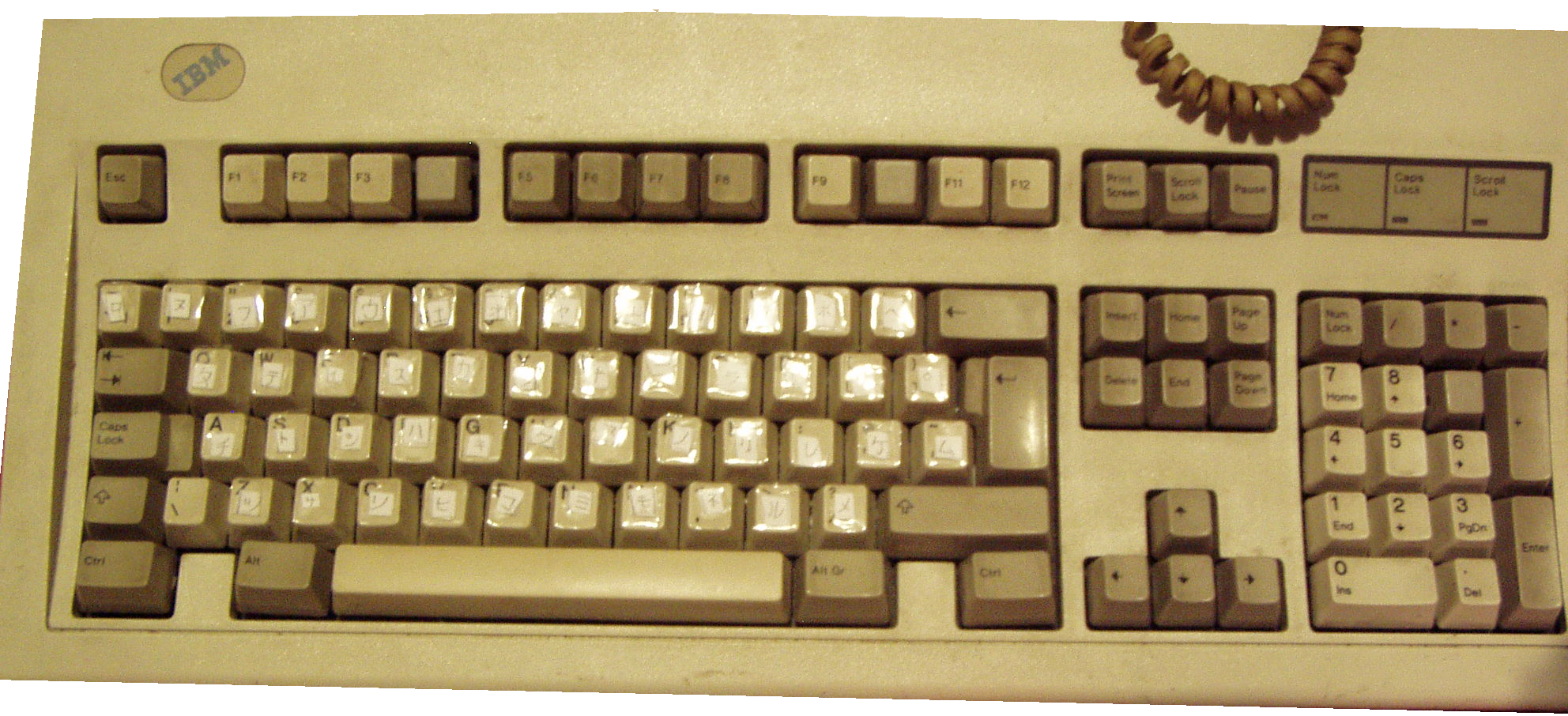
I haven't made a new post here in a long time! I'm not dead, I'm doing well, I passed all my exams in June and I finally got my dream keyboard, the IBM Model M! Here it is (my camera made it look yellow even though it's not yellow at all):
片仮名?You may have noticed I have taped katakana stickers over the keycaps. I've been slowly learning Japanese and I was having a hard time getting used to the Japanese keyboard layout when typing kana, so I thought it would be easier to learn if I put stickers on the keyboard. Instead of ordering stickers, I made my own, since why not? I drew the gojuon table on a paper sheet, wrote all the syllables in it with a pencil, cut the stickers out and used clear Scotch tape to glue them to the keycaps. Simple, functional, free and has a fun DIY chaotic look! Why katakana stickers instead of hiragana? I currently know hiragana better than katakana and hiragana is usually what I type in when using the IME, so I thought having katakana on my keyboard could be a good way to get a bit more katakana usage. If I remember a katakana syllable, I can find it on the keyboard and type in the matching hiragana syllable, which rewards learning katakana. When I type in a hiragana syllable into the computer, I can look at the keyboard to see the matching katakana syllable. I know most IMEs can use romaji instead of kana, but I like kana (and kanji) and I want to use it a lot more than romaji, so that my brain will associate Japanese with kana and not romaji. I taped the stickers on a bit randomly and they often obstruct the Latin letters. This is not an issue for me, since I can easily touch-type the Latin alphabet. For kana, I have already memorized where the most common syllables, like い or の are on the keyboard, but I'm nowhere near touch typing for now. Something that often trips me up with hiragana is left and right, I ALWAYS get さ and ち confused!! When handwriting, I also noticed myself writing し and う backwards! This is funny to me as I haven't had much left/right confusion in my life before. I guess I'll remember it better over time, much like I don't confuse Latin d, b, q and p. People also often consider katakana シ, ツ, ソ and ン painful to distinguish, but I somehow don't seem to have much trouble with those. Disclaimer: My Japanese is terrible and please don't take my words as a tutorial to quickly learn Japanese or anything like that. I'm only sharing my ideas which I think work for me ^_^ The keyboard itself
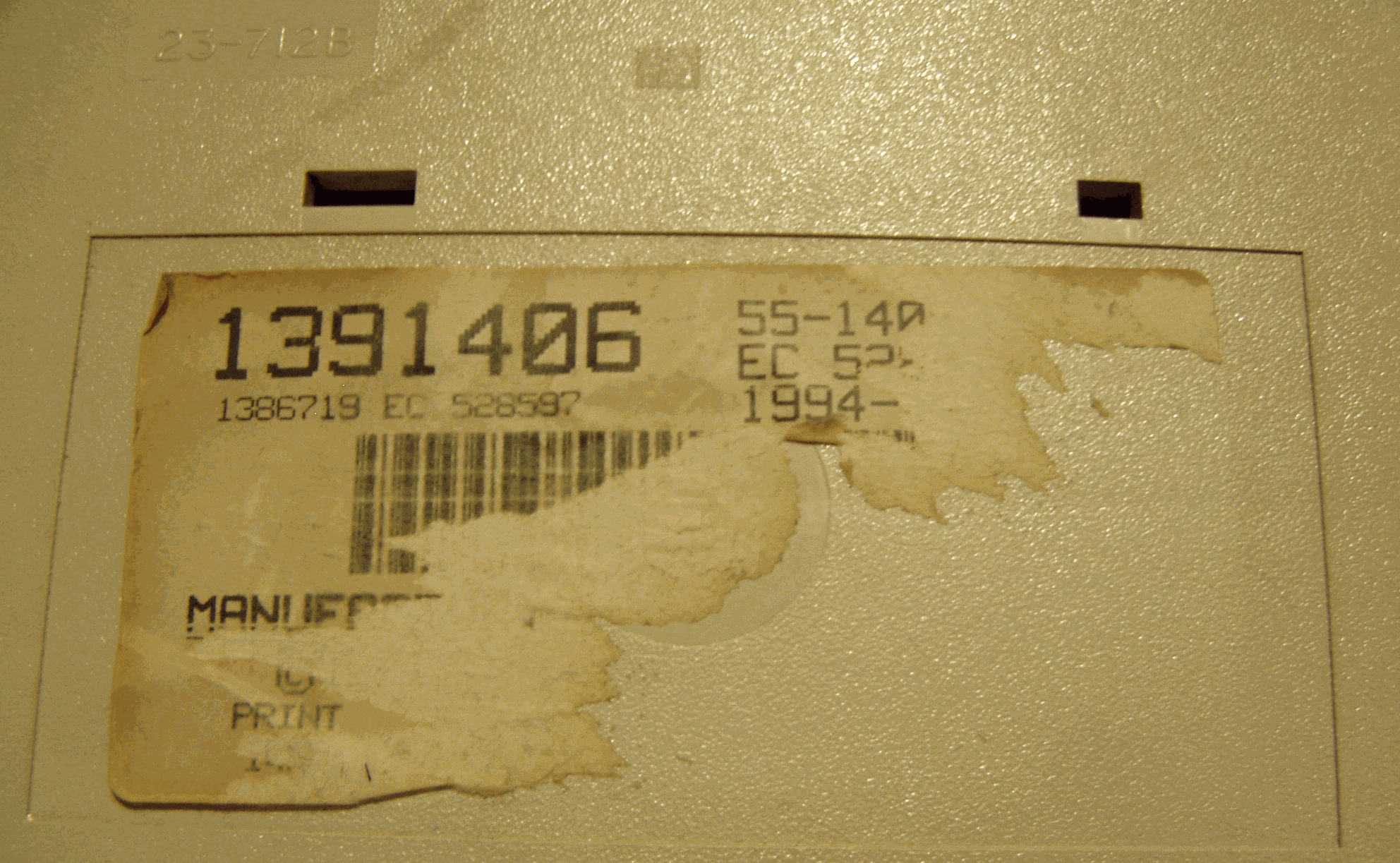
The manufacturing label on this Model M unfortunately is partially torn off, but we can see its part number (1391406) and that it was made in 1994, most likely at the Greenock plant in Scotland. Indeed, it has the British layout with a pound sign on 3 and the backslash between Shift and Z. It's missing the external (more on that later) keycaps on F4, F10 and numpad 9, but other than that it's in pretty much perfect condition. Model Ms were also made in the USA at a plant in Lexington, Kentucky. This plant is owned today by Unicomp, who make Model Ms there to this day! I decided to go for an old IBM instead of a new Unicomp, as shipping a new one here would be a lot more expensive than getting an old one and I happened to find this unit for a decent price. I also like giving new life to old technology. It uses a PS/2 plug which just works with both my Athlon 64 PC natively and with my T430 with an active USB adapter (I heard the small passive adapters won't work). Some older Model Ms use an AT plug instead, which can be plugged into a PS/2 port with a passive adapter. There are also terminal Model Ms, which use a different plug and require an active converter for typical IBM PC usage. The keyboard has a long, gray, hardwired coiled cable. That cable feels so nostalgic, I swear those coiled cables were everywhere in the 2000s! Some older Model Ms had a detachable cable, but this one is still so long that I don't really mind it being hardwired. This keyboard is heavy and feels very well-built, almost indestructible, it truly could be used as a blunt weapon! For a device 32 years old it works like it's brand new, every key is fully responsive, unlike my previous keyboard which had its right Shift break in a few MONTHS. Like most 90s office equipment, it's white/beige (with grey function keys), perfectly fitting in aesthetically with my CRT monitor and my early 2000s PS/2 optical mouse. This 90s beige aesthetic might feel plain to some, for instance I tend to like 2000s tech aesthetics a bit more, but it's a form of minimalism I appreciate a lot. I also think beige electronics are a good base for decorating with stickers and I find them to look so much better than a lot of modern equipment with RGB LEDs everywhere. Speaking of LEDs, this Model M has the standard three green LEDs for Num Lock, Caps Lock and Scroll Lock. I think a small subset of Model Ms didn't have those LEDs. Did I mention that almost every key on the Model M has double keycaps, consisting of an internal blank gray keycap and the external keycap? Now that's some redundancy and quality. The external keycaps can be easily popped off with hands and swapped between keys without removing the internal keycaps under them. Being one of the oldest PC keyboards ever, the Model M has no Windows key, which is a minor inconvenience but it's such a great keyboard I don't even mind the lack of it. Unicomp Model Ms have the Windows key. Buckling springs!The Model M (and its older sister, the IBM Model F) is famous for its buckling spring switches and they are even better than I imagined! I'd say the switches need more pressure to depress than the average keyboard, but less than a typewriter. When you press the key deep enough, the spring in the switch buckles, making a sound and sending the keypress to the computer at the same time. This buckling also lowers the "resistance" of the key to being depressed further, which makes for excellent tactile feedback. When releasing the key, the spring goes back up, making a metallic sound. Something about my brain really enjoys the metallic sound of this keyboard over the more "clicky" sound of most mechanical keyboards. The sound alone is a big reason why I love this keyboard. Buckling springs are definitely on the loud side, if you value your keyboard being quiet, the Model M is likely not for you. Should you get a Model M?If you want a reliable keyboard that can survive a nuclear war, has a metallic sound, 90s beige look, great tactile feedback and you type a lot, I think you'll love the Model M, it's one of the best keyboards ever for typing in my opinion! If you need your keyboard to be quiet, small and/or lightweight though, I'd look for something else. If you're a competitive gamer in games which require quick reaction, the Model M might not be the best for you either, as the above-average force needed to press keys might make it perform worse than a lot of keyboards designed for gaming. However, I think the Model M is great for casual gaming and for slower games, where reaction time matters a lot less, definitely much better than a bog-standard rubber dome keyboard. I mostly use my keyboard for typing (writing, programming, texting, command line) and for some casual gaming, mostly singleplayer, so I find my Model M perfect for me! I wish I bought it earlier instead of using cheap rubber dome keyboards for so long. I think the only keyboard that might ever replace it for me is the Model F, which I heard is even more indestructible and has an even more metallic sound. They tend to be much rarer than Model Ms. If you decide to get a vintage Model M, don't overpay for it! The "wide" (with numpad) PS/2 models, AT models and terminal models are not rare, millions of them were manufactured. If someone lists an old untested keyboard for a ridiculous price like $300, that doesn't mean anyone will pay that much for it. Some variants, like the spacesaver (without numpad), are actually rare and are worth a higher price. |
||
|
|
blog navigator |

|
||