|
|
program manager |
|
|
||
|
|
Triple booting on an old PC, part 3: FreeDOS and GRUB4DOS |
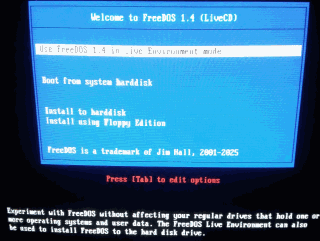
DOS?! In the 2020s?!DOS is a very primitive operating system which was the first system released for the IBM PC. DOS is a single-tasking system, which means only one task can run at a time - no, you can't even open a web browser and a text editor at the same time. DOS is also a real-mode operating system, which means programs have full control of the computer. This doesn't sound bad until you realize a malfunctioning program will crash the whole system and require a reboot (and in the worst case, might even destroy your filesystem). DOS is derived from a system called QDOS, which means Quick and Dirty Operating System - a name appropriate also for its successor. Why would anyone use something like this when even 8-bit CPUs can run multitasking kernels? The simplicity of DOS means it has very low system requirements and uses very little memory, allowing it to get a lot of out of weak hardware. For this reason, A LOT of games have been released for DOS, ranging from simple 2D games to complex fully 3D titles. Low-level programming for DOS can be surprisingly fun too - you can manually handle the things that are usually handled by the operating system today. On top of that, most modern systems can run DOS software with tools like DOSBox, so your DOS program will be usable on a lot of devices! DOS tends to work better with older computers, mostly thanks to it being very old and newer hardware being less compatible with low-level details used by DOS software. That's why I'm going to install it as the 3rd system on my Sempron PC! FreeDOS or MS-DOS?In the 80s and 90s, when DOS was most used, the most common type of DOS was MS-DOS, which was released by Microsoft. The last version of MS-DOS released as a standalone product was 6.22. There was also MS-DOS 7.0, 7.1 and 8.0, which were only released as integral parts of Windows 95, 98 and ME respectively. MS-DOS 7.1 is popular, as Windows 98 has full DOS support unlike ME and 7.1 supports FAT32 unlike 6.22. However, MS-DOS isn't the only type of DOS - there was competition back in the day, most notably Digital Research's DR-DOS. MS-DOS is still pretty much the standard of DOS that DOSes from other developers try to be fully compatible with. One of those other DOSes is FreeDOS, which is an open-source system aiming to be fully compatbile with MS-DOS. I'm going to use FreeDOS myself here, since I like open source software, so why not use it? i might make a post about MS-DOS one day too. Installing FreeDOSAfter putting the install CD (you can get the ISO from freedos.org, floppy install is also provided) and booting the PC from it, we get this bootloader menu:
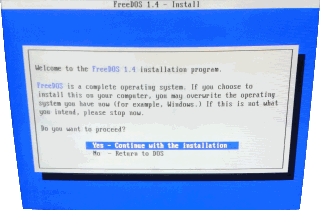
We're installing the system to disk, so let's pick "Install to harddisk". The installer warns us about the risk of overwriting other systems and asks if we want to continue:
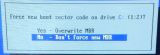
Despite the warning the installer won't overwrite any parttions or MBR unprompted, so let's continue. After continuing, the installer asks for the keyboard layout and if it should overwrite the MBR:
Here we pick "No" - we want to keep the Windows bootloader, instead of using the FreeDOS one, which can only boot DOS. We'll configure the computer to allow selecting 3 systems later.
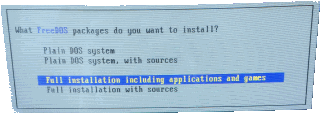
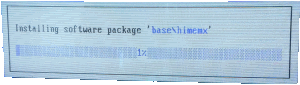
Now we can select if we want a minimal install or something more. I'm picking a full install, which comes with a good amount of open-source DOS software and still takes less than 512 MB. It even lets us install all the source code to experiment around with, but I decided to only install the binaries for now. The installer starts copying files, showing a progress bar:
After waiting for copying to finish, we can remove the install CD and reboot. We won't be able to boot our DOS install yet - to do that, we have to add it to the boot menu, much like we did with OpenBSD in part 2. Can NTLDR boot FreeDOS?NTLDR is the bootloader of Windows XP. It's quite flexible and can boot both Windows and other systems - the latter mostly by loading their own bootloaders. That's how we got OpenBSD to dual boot in part 2 - NTLDR loads the OpenBSD bootloader from the file OPENBSD.PBR. I tried to do the same with the FreeDOS bootloader, which wasn't succsesful, as the FreeDOS bootloader failed to find the DOS partition when started from NTLDR. Luckily, I found a working solution to multi-boot NTLDR systems like Windows XP and FreeDOS - using a more advanced bootloader to correctly tell the FreeDOS bootloader where the system is located. The advanced bootloader we'll be using is GRUB4DOS. Installing GRUB4DOSGRUB is a very common and powerful bootloader most often used with Linux. GRUB4DOS is a version which can be started from a DOS system or NTLDR, supporting NTFS and FAT32. First, we need to download GRUB4DOS from its site (archived direct link) - it comes as a ZIP file. There's quite a bit of files in the ZIP archive, but the only 2 files we need are GRLDR and MENU.LST - we need to copy them to the root of the Windows partition (C:\ for me) and the root of the DOS partition (E:\ for me). GRLDR is the actual bootloader meant to be started from NTLDR, while MENU.LST is its configuration file. Let's open menu.lst in a text editor so we can tell GRUB4DOS how to boot FreeDOS. Do not use Notepad for this - it won't read the line endings properly. Any other editor will work fine, even edit.com from MS-DOS. The default MENU.LST looks like this at the top: color blue/green yellow/red white/magenta white/magenta timeout 30 default /default title find and load NTLDR of Windows NT/2K/XP fallback 1 find --set-root --ignore-floppies /ntldr chainloader /ntldr savedefault --wait=2 The "color" line is used to set the color scheme of GRUB4DOS. The "timeout" line lets us set how many seconds will it wait before it selects the default option. By default, there's a lot of entries which acn be handy for system repair - I'm going to leave them. To add an entry for FreeDOS, all we need to do is put the following after the "default" line (and before the first "title" line): title FreeDOS rootnoverify (hd0,1) chainloader +1 GRUB4DOS counts disks and partitions for 0, so (hd0,1) means FreeDOS is on the 2nd partition of the 1st HDD/SSD. If that's not the case on your setup, change it to point to DOS on your setup - for instance (hd1,1) for 2nd partition of 2nd HDD. The changed MENU.LST should look like this at the beginning: color blue/green yellow/red white/magenta white/magenta timeout 30 default /default title FreeDOS rootnoverify (hd0,1) chainloader +1 title find and load NTLDR of Windows NT/2K/XP fallback 1 find --set-root --ignore-floppies /ntldr chainloader /ntldr savedefault --wait=2 Let's save it both to C:\MENU.LST (Windows partition) and E:\MENU.LST (DOS partition), just to be sure. Now we only need to make GRUB4DOS bootable from NTLDR. Let's do this by adding the following line at the end of BOOT.INI: C:\GRLDR="FreeDOS" I explained BOOT.INI in more detail in part 2. Booting installed FreeDOSAfter a reboot, the computer should allow us to choose between Windows XP, OpenBSD and FreeDOS. Choosing the last one will open GRUB4DOS, where we can proceed to FreeDOS or use other GRUB4DOS options. That's it! I was planning to make a 4th part with ReactOS, but the installer refuses to boot on my Sempron PC - it hangs at a black screen. This sesries is only about installing the systems - I'll write about configuring them, installing drivers, software and so on later! |
||
|
|
blog navigator |

|
||